> For the complete documentation index, see [llms.txt](https://gitbook.clockin.de/llms.txt). Markdown versions of documentation pages are available by appending `.md` to page URLs; this page is available as [Markdown](https://gitbook.clockin.de/mitarbeiter/zeiterfassung-stundenkonto/jahresuebertrag-mitarbeiter.md).
# Wie übertrage ich die Überstunden und den Jahresurlaub für meine Mitarbeiter auf das nächste Jahr?
Bestimmt haben nicht all deine Mitarbeiter ihren Jahresurlaub genommen und nicht alle Überstunden aus dem Vorjahr abgebaut. Wie du diese Daten ganz einfach in das neue Jahr übertragen kannst, erklären
{% hint style="warning" %}
**Hinweis**: Der Jahresübertrag von Urlaubstagen und Überstunden ist immer erst ab dem 01.01. des Folgejahres möglich.
{% endhint %}
## So geht's:
1. Gehe über das Einstellungsrädchen auf den Menüpunkt **Unternehmen**.
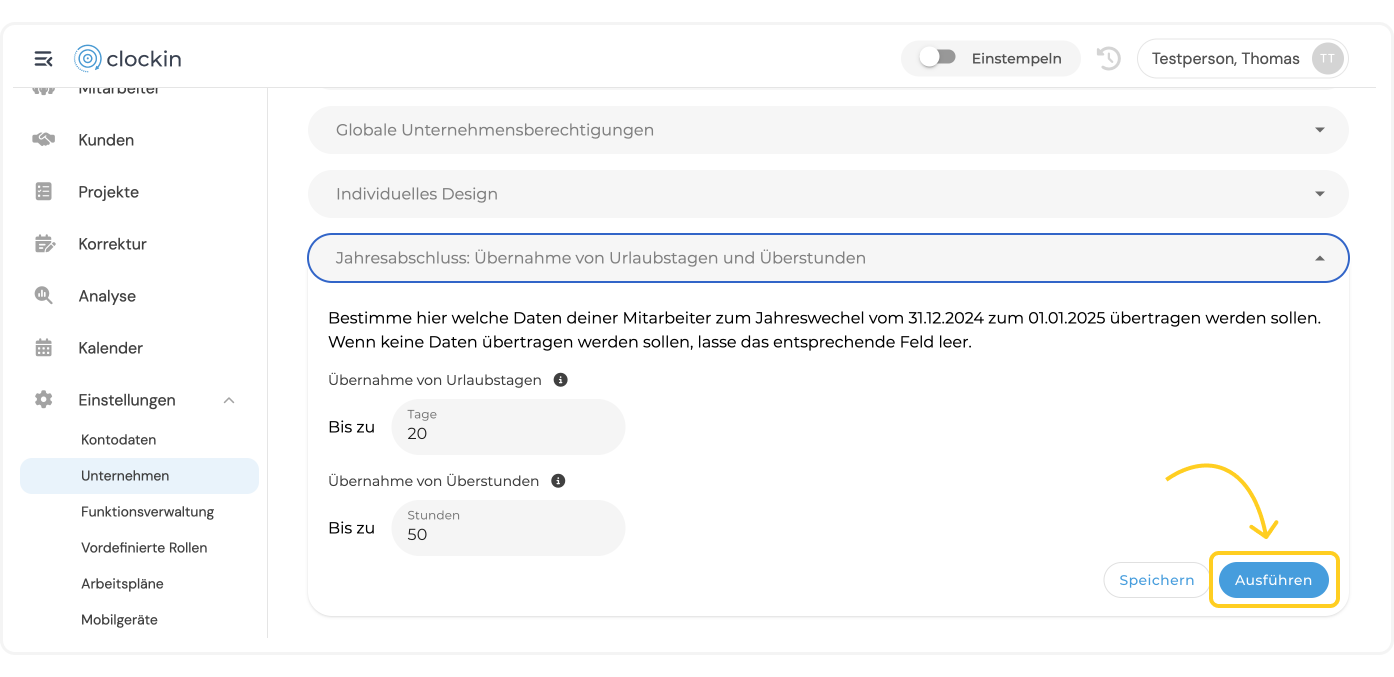
2. Wähle den Reiter **Jahresabschluss: Übernahme von Urlaubstagen und Überstunden**
3. Hier kannst du eintragen, bis zu **wie viele Urlaubstage** deine Mitarbeiter zum Jahreswechsel übernehmen können. Außerdem kannst du eingeben, bis zu **wie viele Überstunden** deine Mitarbeiter zum Jahreswechsel übernehmen können.

4. Nun gibt es **zwei Optionen**:
##
{% hint style="info" %}
**Option 1: Den Übertrag für alle Mitarbeiter in den Unternehmenseinstellungen festlegen**
Drückst du auf **Ausführen, übernimmst du die Änderungen direkt für alle Mitarbeiter.**
 {% endhint %}
{% hint style="success" %}
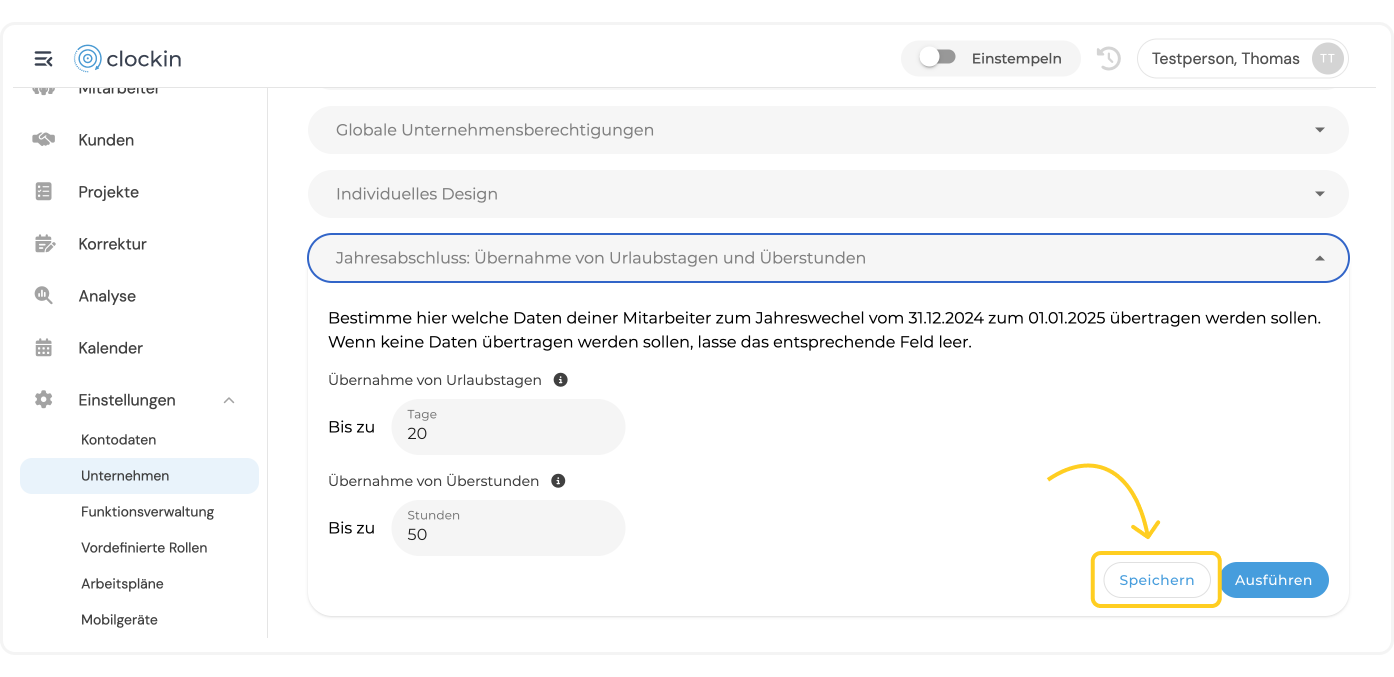
**Option 2: Den Übertrag pro Mitarbeiter individuell anpassenSpeicherst** du die Änderungen\*\*,\*\* sind die Regelungen **in den Mitarbeitereinstellungen individuell anpassbar.**
{% endhint %}
{% hint style="success" %}
**Option 2: Den Übertrag pro Mitarbeiter individuell anpassenSpeicherst** du die Änderungen\*\*,\*\* sind die Regelungen **in den Mitarbeitereinstellungen individuell anpassbar.**
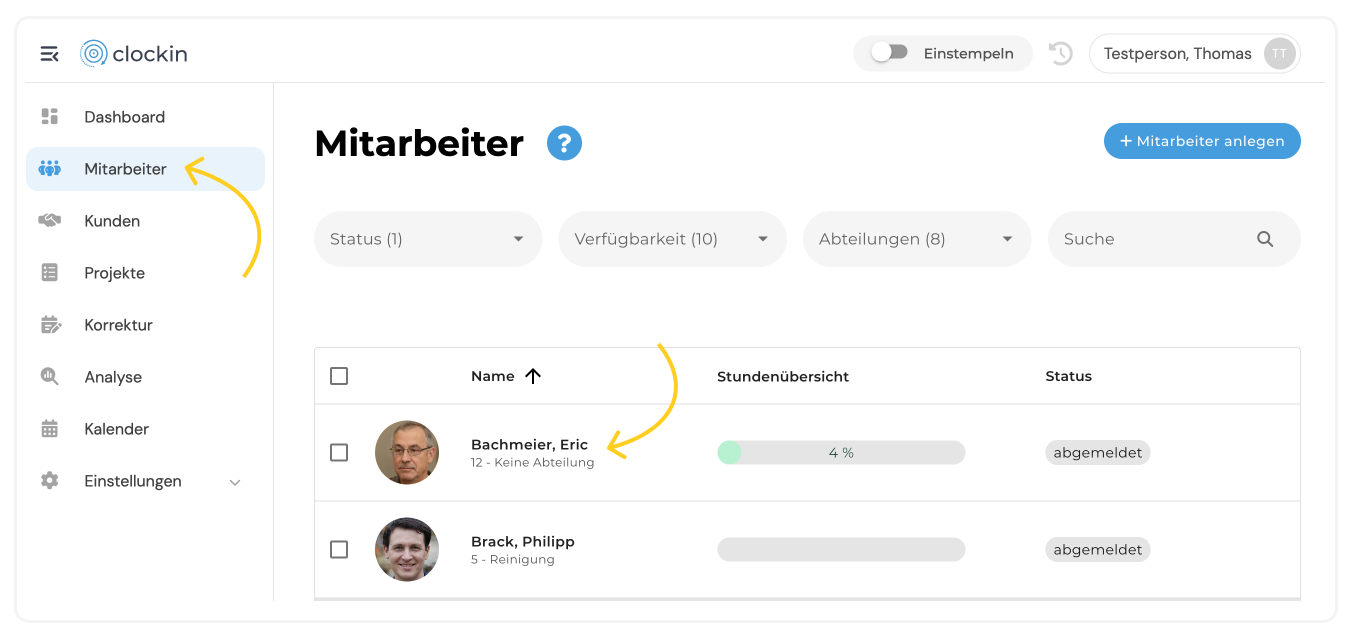
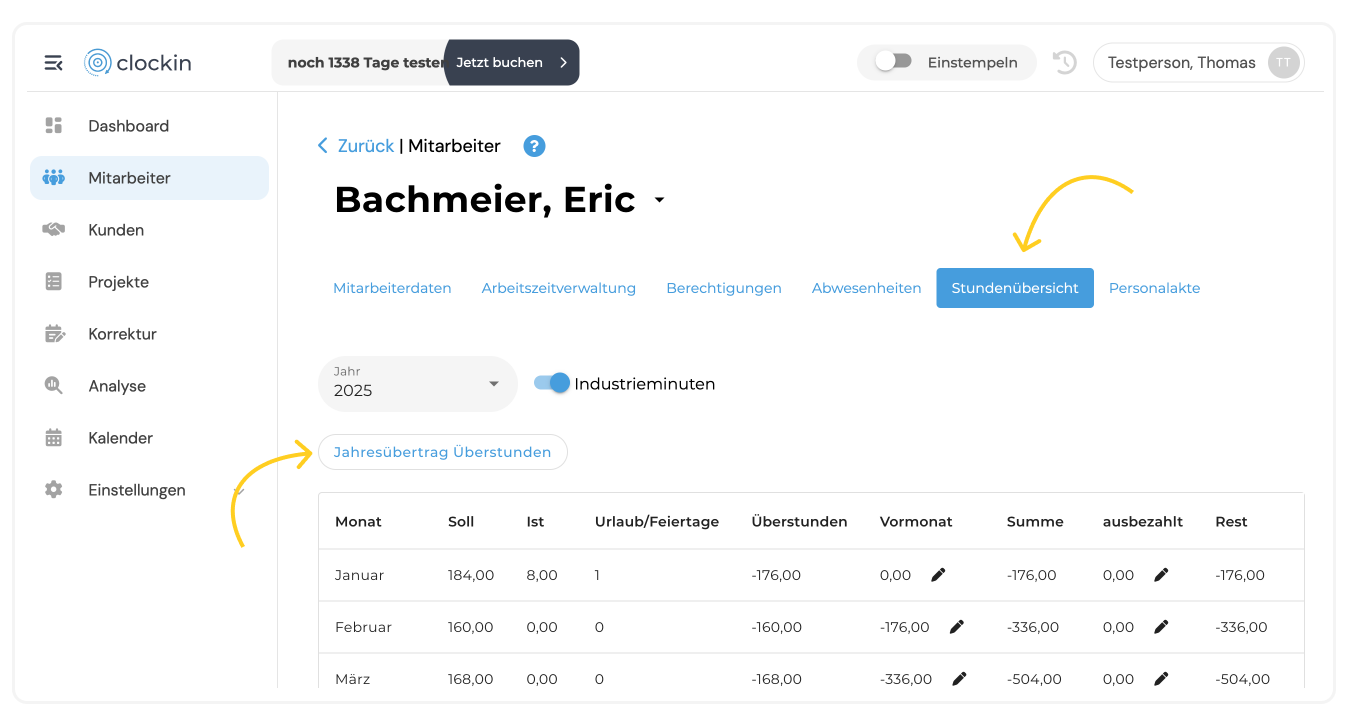
 Danach kannst du unter dem Menüpunkt **Mitarbeiter** den **Mitarbeiter auswählen**, für welchen du den Jahresurlaub bzw. die Überstunden individuell zum Jahreswechsel übernehmen möchtest.
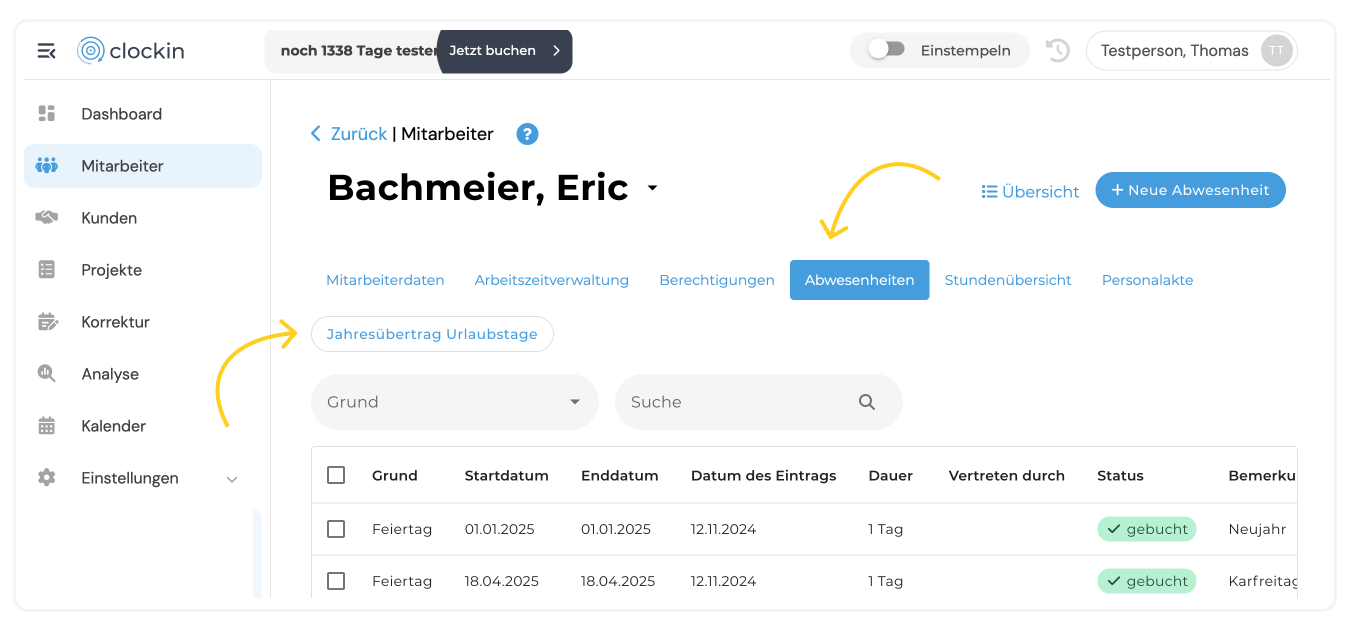
 Über den Menüpunkt **Abwesenheiten** hast du die Möglichkeit, den **Jahresübertrag für die Urlaubstage** vorzunehmen.
 Über den Menüpunkt **Stundenübersicht hast du die Möglichkeit, den Jahresübertrag für die Überstunden** vorzunehmen.
 {% endhint %}
***
---
# Agent Instructions
This documentation is published with GitBook. GitBook is the documentation platform designed so that both humans and AI agents can read, navigate, and reason over technical content effectively. Learn more at gitbook.com.
## Querying This Documentation
If you need additional information that is not directly available in this page, you can query the documentation by asking a question.
Perform an HTTP GET request on the following URL with the `ask` and `goal` query parameters:
```
GET https://gitbook.clockin.de/mitarbeiter/zeiterfassung-stundenkonto/jahresuebertrag-mitarbeiter.md?ask=&goal=
```
`ask` is the immediate question: it should be specific, self-contained, and written in natural language.
`goal` is what the user is ultimately trying to achieve, the reason they need the answer. Sharing it helps GitBook give you a better, more relevant answer. A goal is most helpful when it describes the outcome the user wants rather than restating the question. For example, with `ask=how do I create an API token`, a goal like `automate deployments from our CI pipeline` lets GitBook tailor the answer to that use case.
The response will contain a direct answer to the question and relevant excerpts and sources from the documentation.
Use this mechanism when the answer is not explicitly present in the current page, you need clarification or additional context, or you want to retrieve related documentation sections.
{% endhint %}
***
---
# Agent Instructions
This documentation is published with GitBook. GitBook is the documentation platform designed so that both humans and AI agents can read, navigate, and reason over technical content effectively. Learn more at gitbook.com.
## Querying This Documentation
If you need additional information that is not directly available in this page, you can query the documentation by asking a question.
Perform an HTTP GET request on the following URL with the `ask` and `goal` query parameters:
```
GET https://gitbook.clockin.de/mitarbeiter/zeiterfassung-stundenkonto/jahresuebertrag-mitarbeiter.md?ask=&goal=
```
`ask` is the immediate question: it should be specific, self-contained, and written in natural language.
`goal` is what the user is ultimately trying to achieve, the reason they need the answer. Sharing it helps GitBook give you a better, more relevant answer. A goal is most helpful when it describes the outcome the user wants rather than restating the question. For example, with `ask=how do I create an API token`, a goal like `automate deployments from our CI pipeline` lets GitBook tailor the answer to that use case.
The response will contain a direct answer to the question and relevant excerpts and sources from the documentation.
Use this mechanism when the answer is not explicitly present in the current page, you need clarification or additional context, or you want to retrieve related documentation sections.