> For the complete documentation index, see [llms.txt](https://gitbook.clockin.de/llms.txt). Markdown versions of documentation pages are available by appending `.md` to page URLs; this page is available as [Markdown](https://gitbook.clockin.de/sonstiges/wie-trete-ich-dem-clockin-neuigkeiten-channel-auf-whatsapp-bei.md).
# Wie trete ich dem clockin Neuigkeiten-Channel auf WhatsApp bei?
In diesem Artikel erfährst Du, wie Du dem clockin Neuigkeiten-Channel auf WhatsApp beitrittst und keine Updates mehr verpasst.
Verpasse keine wichtigen Neuigkeiten mehr rund um clockin. Über unseren neuen WhatsApp-Channel bekommst Du Updates, Tipps und Infos zu neuen Funktionen direkt aufs Handy – ganz ohne Login und ohne dass Du extra ins Bürocenter schauen musst.
## Was ist der clockin Neuigkeiten-Channel?
Der Channel ist wie ein Newsticker in WhatsApp. Wir posten dort regelmäßig:
* Neue Funktionen und Updates
* Praktische Tipps für Deinen Arbeitsalltag mit clockin
* Wichtige Infos, zum Beispiel zu geplanten Wartungsarbeiten oder Aktionen und Angebote
Du musst nichts weiter tun, als beizutreten. Die Nachrichten kommen automatisch bei Dir an.
## So trittst Du bei:
**Du liest diesen Artikel gerade auf dem Handy?** Dann tippe einfach auf diesen Link, und WhatsApp öffnet sich direkt: 👉 [Zum clockin Neuigkeiten-Channel](https://www.whatsapp.com/channel/0029Vb8XgJd0wajoROlnSY2X)
**Du sitzt gerade am Computer?** Dann nimm Dein Handy zur Hand und scanne diesen QR-Code mit der Kamera-App:

WhatsApp öffnet sich automatisch. Tippe danach nur noch auf **„Beitreten"** – fertig.
{% hint style="success" %}
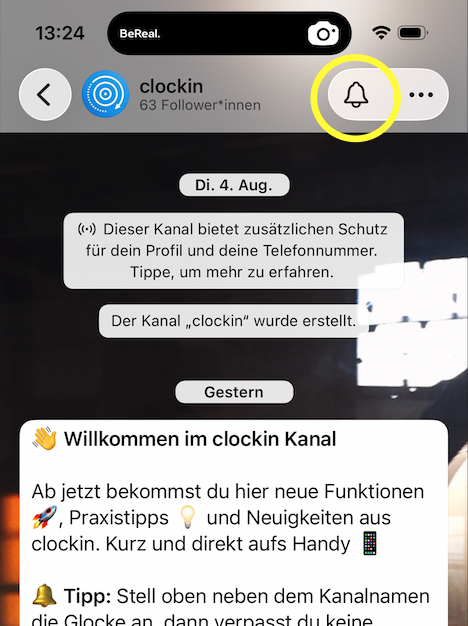
**Tipp: Glocke aktivieren** 🔔
Damit Du keine Nachricht verpasst, aktiviere die Benachrichtigungen für den Channel. Tippe dazu oben rechts auf die drei Punkte, wähle **„Stummschalten"** und stelle sicher, dass die Glocke **nicht** durchgestrichen ist. So bekommst Du sofort eine Benachrichtigung, wenn wir etwas Neues posten.
 {% endhint %}
---
# Agent Instructions
This documentation is published with GitBook. GitBook is the documentation platform designed so that both humans and AI agents can read, navigate, and reason over technical content effectively. Learn more at gitbook.com.
## Querying This Documentation
If you need additional information that is not directly available in this page, you can query the documentation by asking a question.
Perform an HTTP GET request on the following URL with the `ask` and `goal` query parameters:
```
GET https://gitbook.clockin.de/sonstiges/wie-trete-ich-dem-clockin-neuigkeiten-channel-auf-whatsapp-bei.md?ask=&goal=
```
`ask` is the immediate question: it should be specific, self-contained, and written in natural language.
`goal` is what the user is ultimately trying to achieve, the reason they need the answer. Sharing it helps GitBook give you a better, more relevant answer. A goal is most helpful when it describes the outcome the user wants rather than restating the question. For example, with `ask=how do I create an API token`, a goal like `automate deployments from our CI pipeline` lets GitBook tailor the answer to that use case.
The response will contain a direct answer to the question and relevant excerpts and sources from the documentation.
Use this mechanism when the answer is not explicitly present in the current page, you need clarification or additional context, or you want to retrieve related documentation sections.
{% endhint %}
---
# Agent Instructions
This documentation is published with GitBook. GitBook is the documentation platform designed so that both humans and AI agents can read, navigate, and reason over technical content effectively. Learn more at gitbook.com.
## Querying This Documentation
If you need additional information that is not directly available in this page, you can query the documentation by asking a question.
Perform an HTTP GET request on the following URL with the `ask` and `goal` query parameters:
```
GET https://gitbook.clockin.de/sonstiges/wie-trete-ich-dem-clockin-neuigkeiten-channel-auf-whatsapp-bei.md?ask=&goal=
```
`ask` is the immediate question: it should be specific, self-contained, and written in natural language.
`goal` is what the user is ultimately trying to achieve, the reason they need the answer. Sharing it helps GitBook give you a better, more relevant answer. A goal is most helpful when it describes the outcome the user wants rather than restating the question. For example, with `ask=how do I create an API token`, a goal like `automate deployments from our CI pipeline` lets GitBook tailor the answer to that use case.
The response will contain a direct answer to the question and relevant excerpts and sources from the documentation.
Use this mechanism when the answer is not explicitly present in the current page, you need clarification or additional context, or you want to retrieve related documentation sections.